Home
Jump To Top
About Me

SI Prefixes

NameSymbolPower of Ten
yottaY×1024
zettaZ×1021
exaE×1018
petaP×1015
teraT×1012
gigaG×109
megaM×106
kilok×103
none×100
millim×10-3
microµ×10-6
nanon×10-9
picop×10-12
femtof×10-15
attoa×10-18
zeptoz×10-21
yoctoy×10-24
STL / STEP Viewer

Drag & drop an .stl or .step/.stp file here

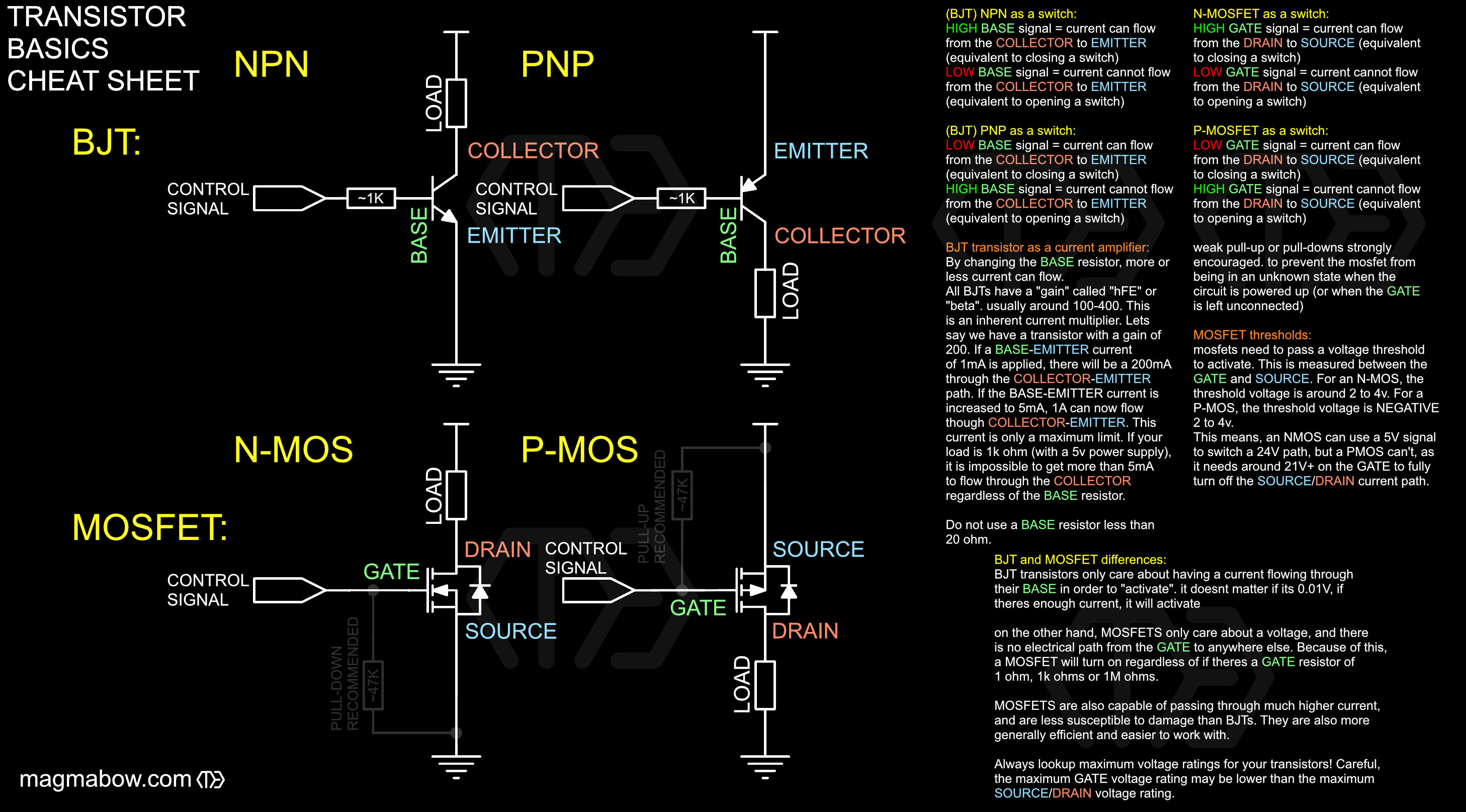
Transistor Basics Cheat Sheet
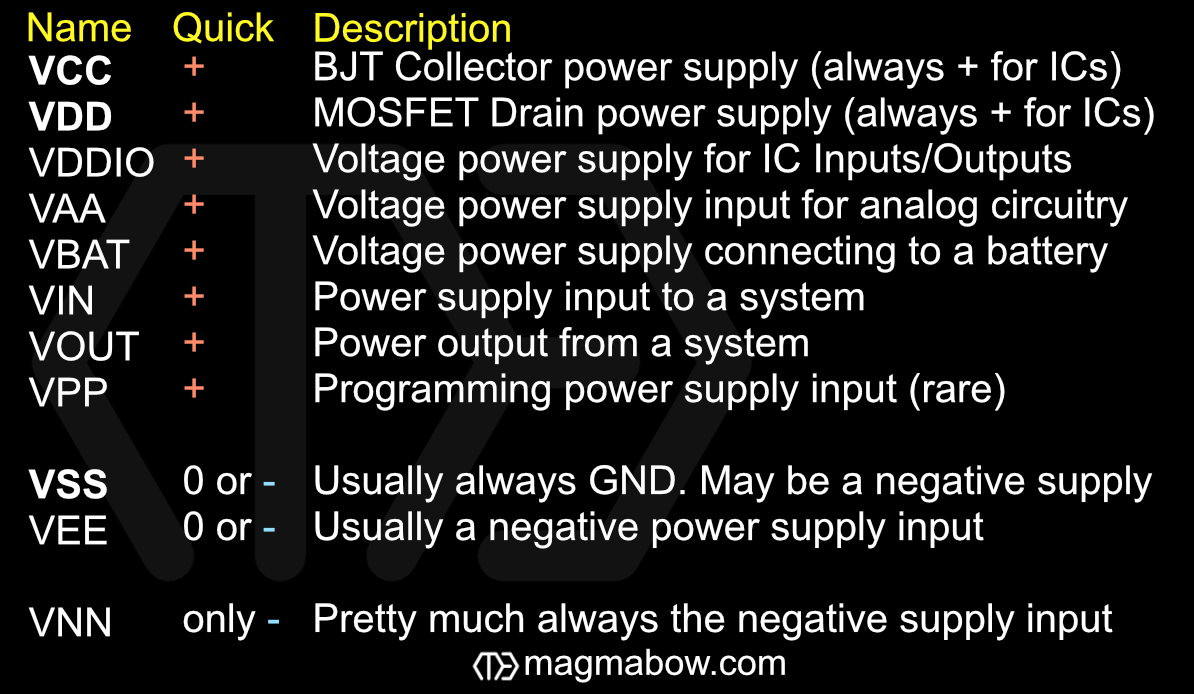
Power Supply Pin Naming
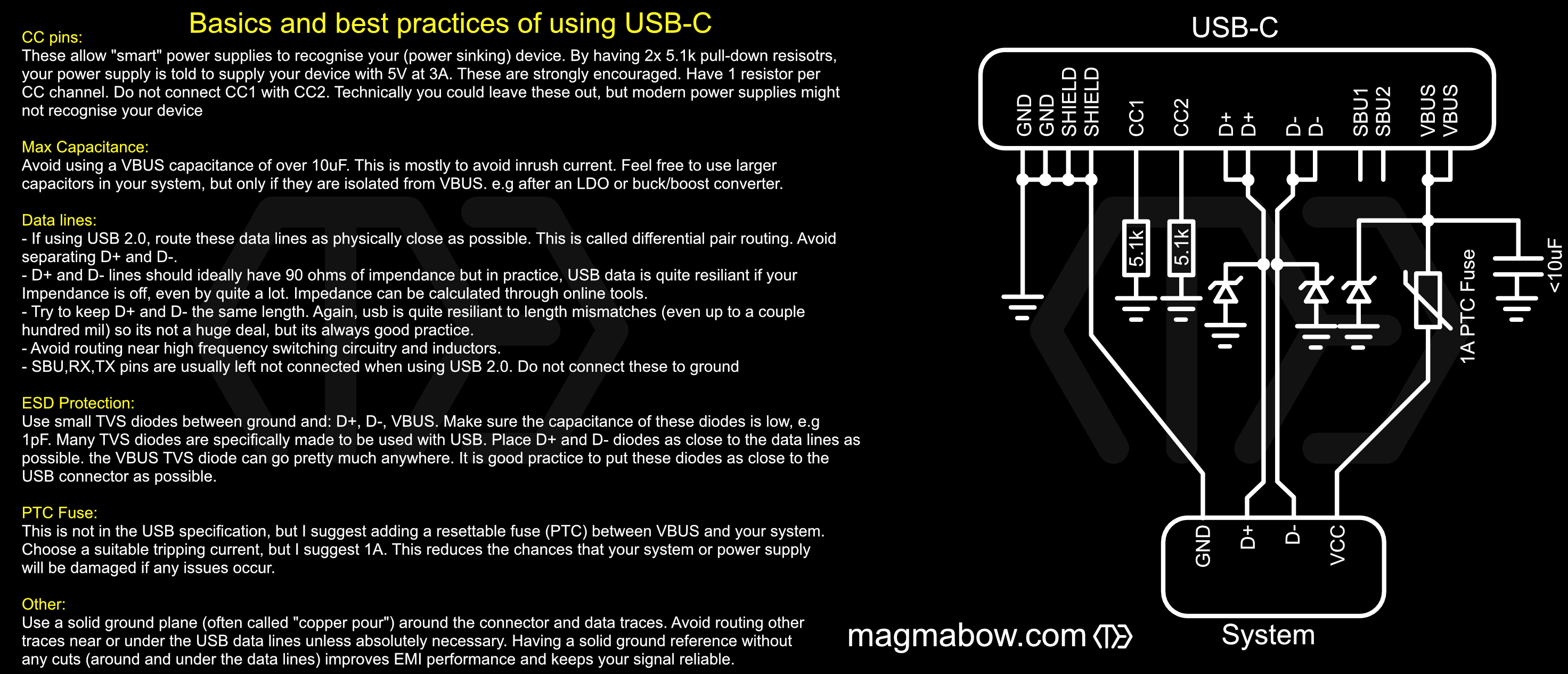
Basics and best practices of USB-C
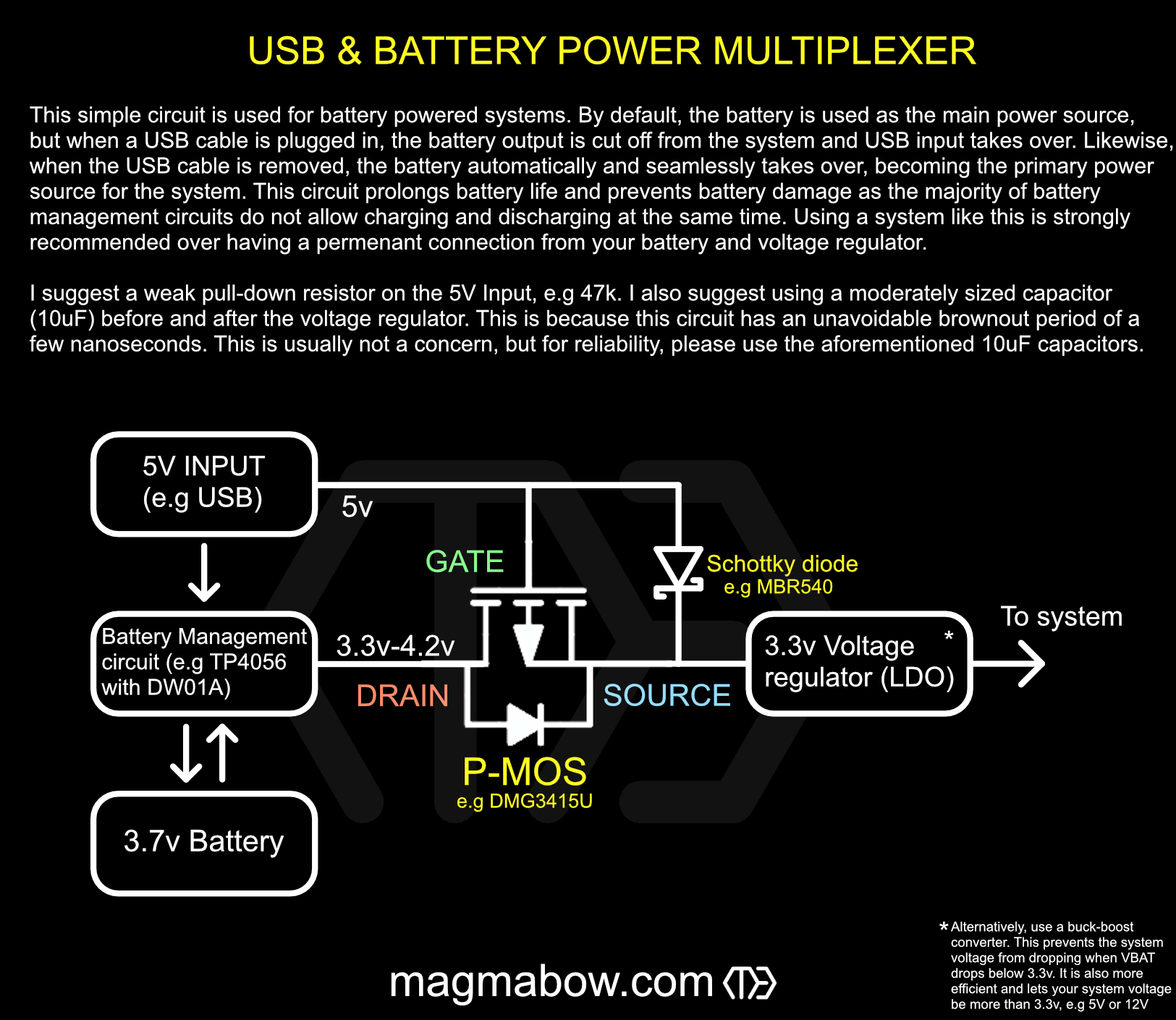
USB and Battery power multiplexer
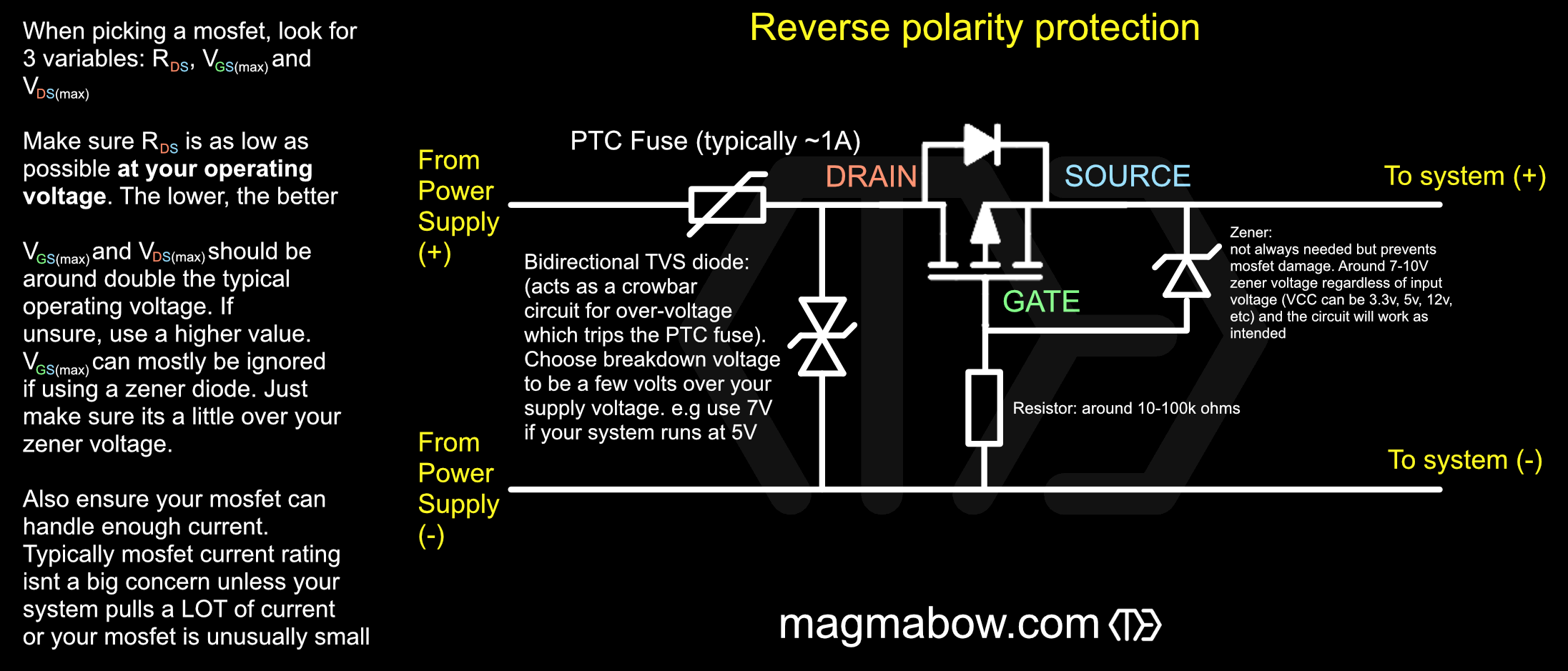
Reverse Polarity Protection
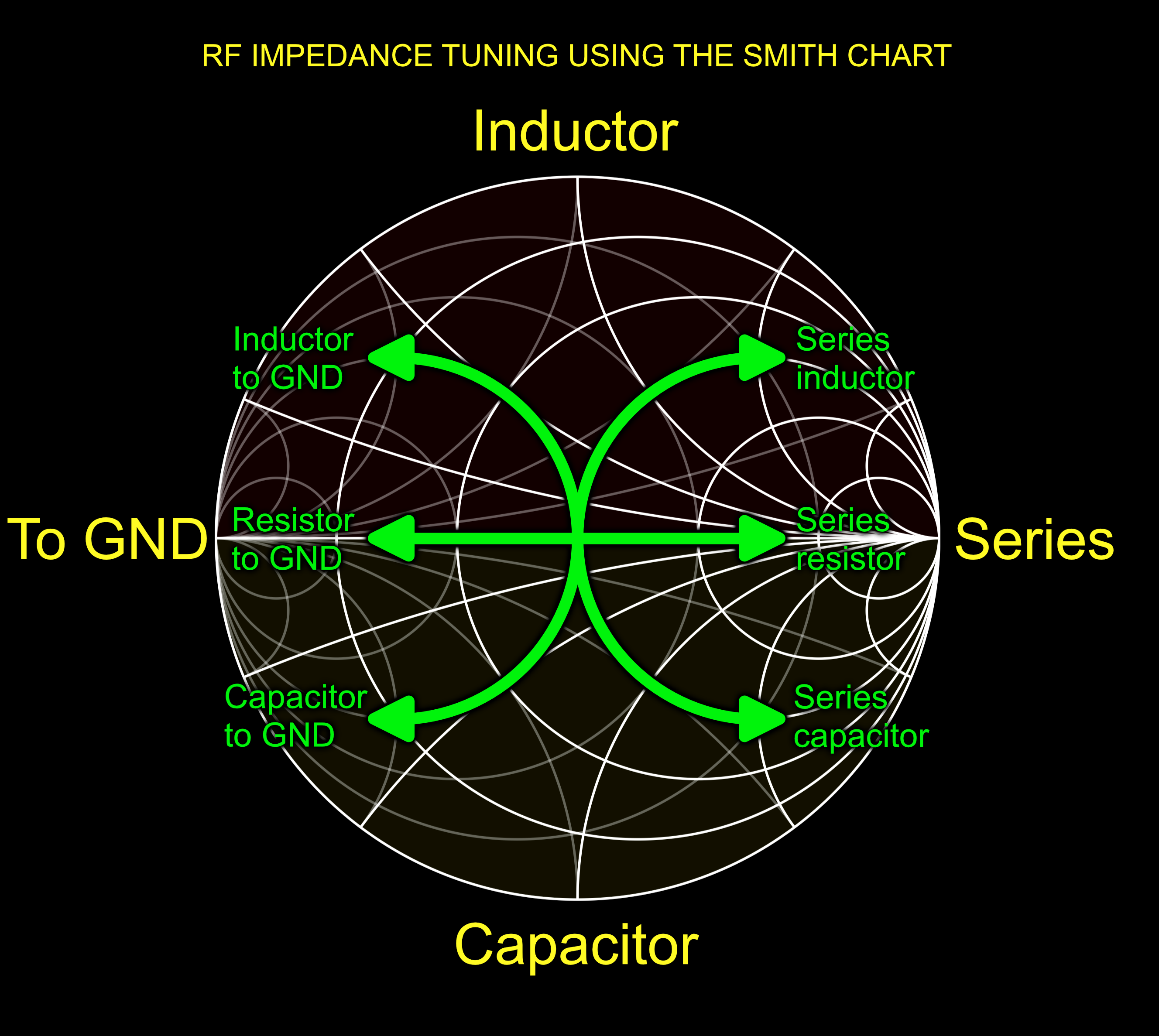
Smith chart Impedance tuning helper
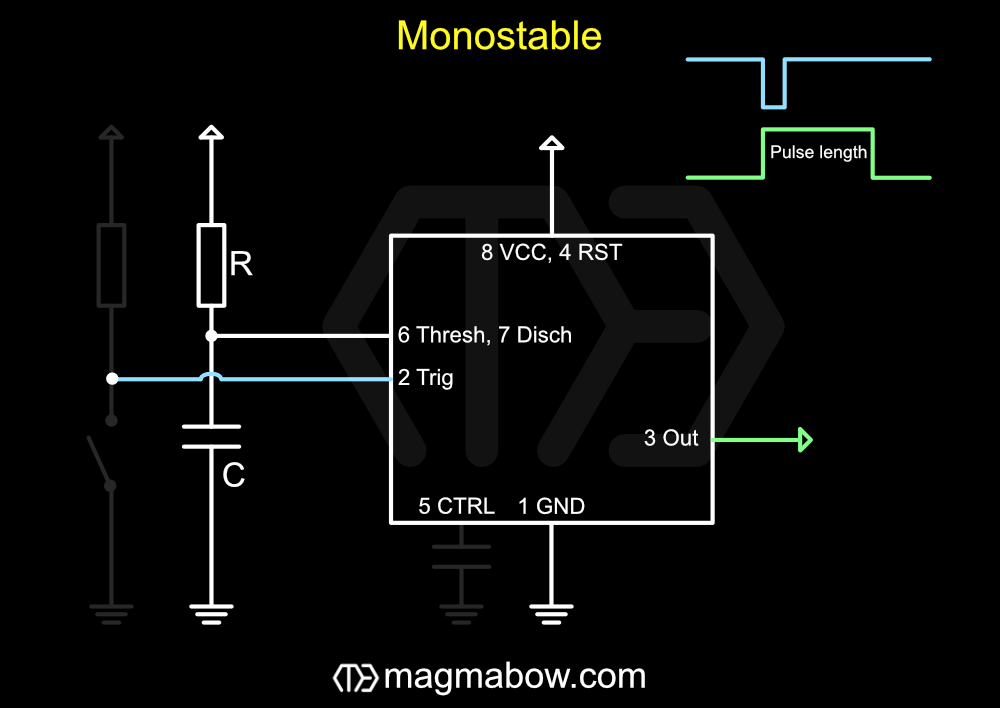
555 Monostable calculator
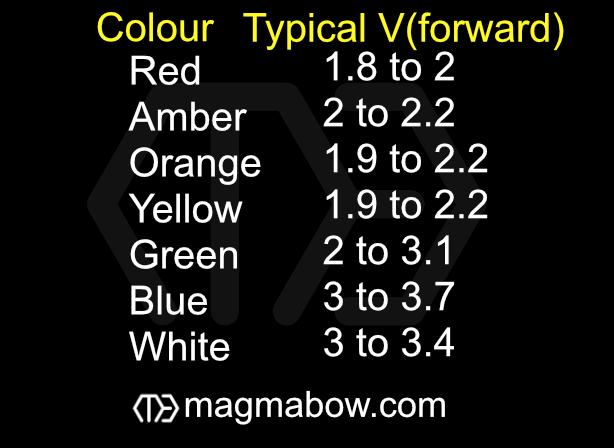
LED Forward Voltages
Opamp Gain configurations
555 Astable calculator
Crystal Load Capacitor
Vmax 0 0 τ
Free-Type Calculator

Operators & Functions

  • + − * / Add, subtract, multiply, divide.
  • ^ Power, e.g. 2^3 = 8. Right-associative and evaluated before * /.
  • ( ) Brackets, can be nested. Follows standard order of operations (BIDMAS/PEMDAS).
  • sqrt() Square root.
  • sin() cos() tan() Trigonometric functions.
  • log() Base-10 logarithm.
  • ln() Natural logarithm.
  • abs() Absolute value.
  • exp() e raised to the given power.
  • pi e Constants.

Values can use SI prefixes, e.g. 100n, 5k, 200G. Nested brackets are colour-coded outside-in (blue, green, red, yellow, purple); anything nested deeper than that is shown in white. Just type an expression into the box below and the result updates as you go.

Calculator

Result

Free-Type Box

Data in this text field is not stored or sent. When refreshing, this box will be cleared and reset. Please do not enter any private/confidential information.

Electronics/Engineering Tools

This page just has some useful tools to make life easier…

Engineering Notation i When enabled, standard form results always use an exponent that's a multiple of 3 (e.g. 50e6 instead of 5e7), matching common electronics prefixes (p, n, µ, m, k, M, G). Applies to all standard form results and inputs on this page.
Use SI Prefixes i Shows standard form results using SI prefixes (p, n, µ, m, k, M, G, etc) instead of powers of ten, e.g. 200e3 becomes 200k. Inputs can always be written as e-notation, a prefix letter, or a plain number, for example 200e3, 200k, or 200000.

Converters

Standard Form Converter i Converts between a regular number and standard form, either direction. Use the Engineering Notation toggle above to switch between basic (e.g. 1e7) and engineering (e.g. 10e6) exponents. You can type e-notation, an SI prefix, or a plain number into either field, for example 200e3, 200k, or 200000.
SI Prefix Converter i Converts a value into a chosen SI prefix. Type e-notation, an SI prefix, or a plain number, for example 200e3, 200k, or 200000, then pick the output unit from the dropdown. Selecting "none" outputs the plain base value with no prefix letter, e.g. 470u becomes 0.00047.
mm ↔ mil Converter i Both boxes can be typed into, and the other will be converted!
Vpeak ↔ Vrms ↔ Vpk-pk i All three boxes can be typed into, and the other two will be converted! Assumes a sine wave, where Vrms = Vpeak / √2 and Vpk-pk = 2×Vpeak.
Copper oz/ft² Converter i Converts PCB copper weight (oz/ft²) to physical thickness in metres, either direction. Both boxes can be typed into, and the other will be converted!

Electronics Calculators

Series / Parallel i Choose a component type and a series or parallel configuration, then enter two or more values (SI prefixes supported, e.g. 4.7k, 100n, 10m). Resistors and inductors add directly in series and combine reciprocally in parallel; capacitors do the opposite. Use + to add another value, and × to remove one (minimum two).
Ohm's Law i Enter any two of Voltage, Current, and Resistance and the third fills in automatically. Values can use SI prefixes, e.g. 5m, 2k, 100n. Power (P = VI) is calculated from the Voltage and Current values.
Voltage Divider i VCC–(R1)–VOUT–(R2)–GND. Enter the supply Voltage, the top resistor R1, and the bottom resistor R2 to get VOUT. Values can use SI prefixes, e.g. 5k, 4.7k.
LED Resistor i Enter the supply voltage, the LED's forward voltage, and the desired current to get the current-limiting resistor value. Values can use SI prefixes, e.g. 5, 2.1, 20m. Tap VIEW for typical LED forward voltages.
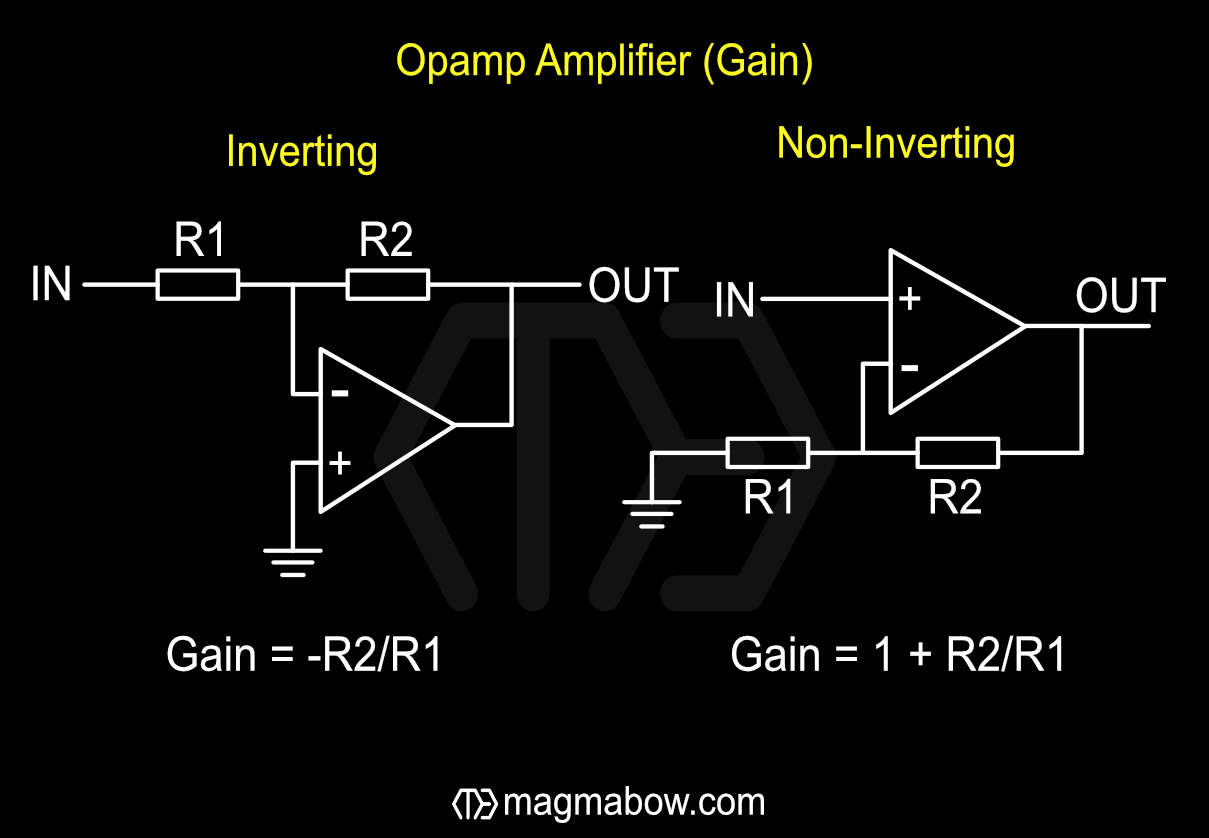
Opamp Gain i Choose Inverting or Non-inverting configuration and enter R1 and R2 to get the voltage gain. Values can use SI prefixes, e.g. 4.7k, 100k. Tap VIEW to see the amplifier diagrams.
Trace Resistance Calculator i Enter the trace's length, width, and thickness (all in metres), plus the conductor's resistivity (Ω·m, e.g. copper ≈ 1.68e-8), to get the trace resistance. Values can use SI prefixes, e.g. 100u, 35u, 1.68e-8.
Inductive Reactance (XL) i Enter frequency in Hz and inductance in H. To quickly change the value, click and drag left/right.
Capacitive Reactance (XC) i Enter frequency in Hz and capacitance in F. To quickly change the value, click and drag left/right.
Total Reactance (XL-XC) i Positive means net inductive, negative means net capacitive. Auto-filled from the XL and XC calculators above, or enter your own values. To quickly change the value, click and drag left/right.
LC Resonant Frequency i Enter the inductance and capacitance of an LC circuit to get its resonant frequency. Values can use SI prefixes, e.g. 100n, 5k, 10m.
Q Factor i Enter the inductive reactance and resistance to get the circuit's Q factor. Auto-fills from the XL calculator above, or enter your own values. Values can use SI prefixes, e.g. 4.7k, 100n.
Impedance (Z) i Enter total reactance and resistance in Ω. Reactance auto-fills from the Total Reactance calculator above. To quickly change the value, click and drag left/right.
RC Low Pass Filter i Filter for removing high frequencies: -3dB cut-off with the following configuration: input→resistor→capacitor to ground→out. Values can use SI prefixes, e.g. 4.7k, 100n.
RC High Pass Filter i Filter for removing low frequencies: -3dB cut-off with the following configuration: input→capacitor→pull down resistor→out. Values can use SI prefixes, e.g. 4.7k, 100n.
Capacitor Time Constant i Enter the resistance and capacitance of an RC circuit to get its time constant, tau: the time taken to charge or discharge by about 63.2% of the difference between the start and target voltage. Values can use SI prefixes, e.g. 4.7k, 100n.
Capacitor Discharging i Choose Charging or Discharging, pick which value to solve for, then enter the other three (τ = RC, see the calculator above). Values can use SI prefixes, e.g. 100n, 5k, 10m.
Inductor Time Constant i Enter the inductance and resistance of an RL circuit to get its time constant, tau: the time taken for current (or inductor voltage) to change by about 63.2% of the difference between the start and target value. Values can use SI prefixes, e.g. 4.7k, 100m.
Voltage Across Inductor i Pick which value to solve for, then enter the other three (τ = L/R, see the calculator above). This applies to the inductor's own voltage as current either rises or falls toward its new steady-state value. Values can use SI prefixes, e.g. 100n, 5k, 10m.
TH Resistor Code i 4-band: num. num. mult. tol.
5-band: num. num. num. mult. tol.
6-band: num. num. num. mult. tol. ppm

Pick colour bands for a through-hole resistor and click the + to step through 4, 5, and 6-band modes.
SMD Resistor Code i Enter a 3 or 4 digit SMD resistor code. Every digit except the last is a significant figure; the last digit is the power-of-ten multiplier, e.g. 123 is 12×10³ = 12e3 Ω, and 6543 is 654×10³ = 654e3 Ω.
SMD Capacitor Code i Enter a 3 digit SMD capacitor code, in picofarads. The first two digits are a significant figure; the last digit is the power-of-ten multiplier: ABC = AB×10(C−12) F, e.g. 123 is 12×103−12 = 12nF, and 104 is 10×104−12 = 100nF.
555 Monostable calculator i Enter the timing resistor and capacitor values for a 555 monostable circuit to get the output pulse width, T. Values can use SI prefixes, e.g. 4.7k, 100n.
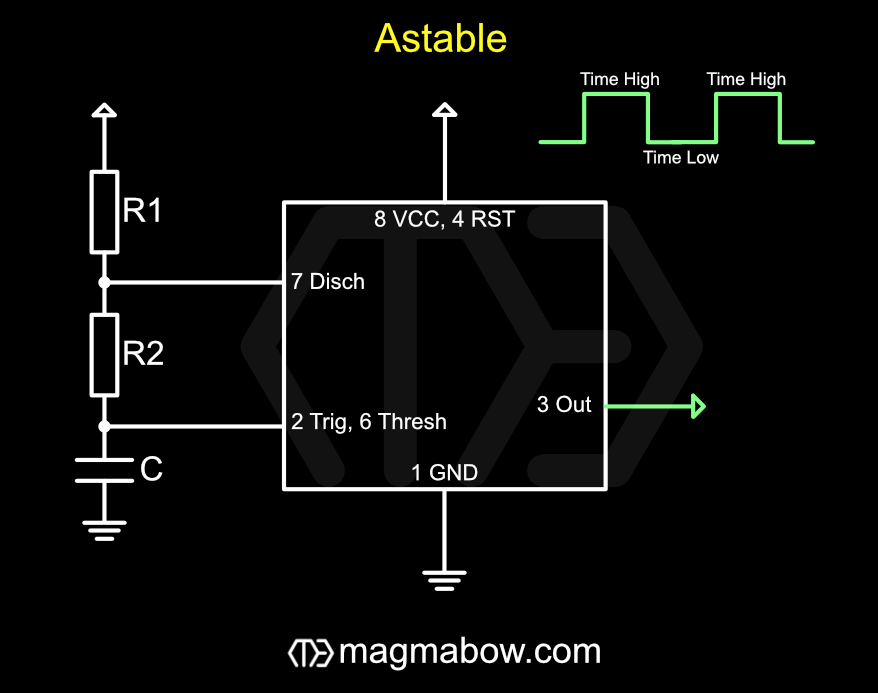
555 Astable calculator i Enter the timing resistors and capacitor for a 555 astable circuit to get the output frequency, low time, high time, and duty cycle. Values can use SI prefixes, e.g. 4.7k, 100n.
AWG Wire Calculator i Enter an American Wire Gauge number (use -1, -2, -3 for 00, 000, 0000) to get the wire's diameter, cross-sectional area, and an approximate maximum current rating using the conservative 700 circular-mils-per-amp rule. Actual safe current depends on insulation, bundling, and installation — treat this as a rough guide only.
Trace Propagation Speed i Enter a dielectric constant (relative permittivity, εr) to get the signal propagation speed through that material, both as an absolute speed and as a percentage of the speed of light.
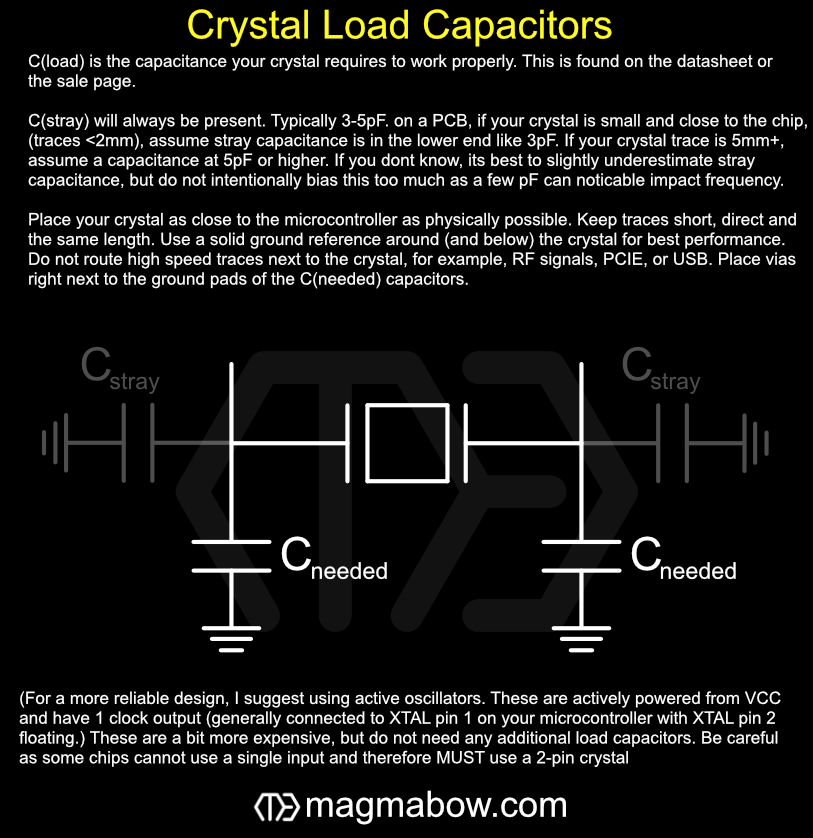
Crystal Load Capacitor i Enter the crystal's load capacitance (from its datasheet, typically 10pF–24pF) and the estimated stray capacitance of your board, traces, and pads (typically 3pF–5pF) to get the required capacitor value for each of the two loading capacitors.
Max Stepper Motor Speed i Enter the coil inductance, coil current, drive voltage, and steps per revolution to estimate the maximum stepper speed and the pulse (step) frequency needed to drive it. Values can use SI prefixes, e.g. 2.5m, 12, 1.5.

Note: V should be the actual driver supply voltage, not the motor's rated voltage — most drivers run well above the motor's rating and use PWM current chopping. This is an idealized estimate; it ignores back-EMF and coil resistance, so real-world max speed will differ.
ADC Resolution i Enter the ADC's bit depth and the maximum reference voltage to get the smallest voltage step the ADC can resolve. Values can use SI prefixes, e.g. 8, 12, 3.3.

Electronic diagrams/lookups

Transistor Basics Cheat Sheet
Power Supply Pin Naming
Basics and best practices of USB-C
USB and Battery power multiplexer
Reverse Polarity Protection
Smith chart Impedance tuning helper

MATHS

General Calculator i Pick an operation and enter your values (SI prefixes supported, e.g. 100n, 5k, 5.1e3), handy for quick engineering maths like 100n × 5k. Addition, subtraction, multiplication, and division apply left-to-right across all entered values; use + to add more. Nth Root and Nth Power take a value and an n. Reciprocal takes a single value.
Free-Type Calculator i Type any expression using + − * / and ^ (power), following standard order of operations (BIDMAS/PEMDAS) with support for brackets. Functions: sqrt(), sin(), cos(), tan(), log() (base 10), ln() (natural log), abs(), exp(). Constants: pi and e. Values can use SI prefixes, e.g. 100n, 5k, 200G. Nested brackets are colour-coded outside-in (blue, green, red, yellow, purple); anything nested deeper than that is shown in white.
Result

Image/Color

RGB ↔ HEX Converter i Input RGB values of 0-255. Percentages can also be typed in, for example "50%". To quickly change the value, click and drag left/right.
HSV ↔ HEX Converter i H (Hue) 0-360, S (Saturation) 0-100, V (Value) 0-100. Percentages can also be typed in, for example "50%". To quickly change the value, click and drag left/right.
Hex Viewer
Color Picker
Image Compressor/File Converter
Gif Decompiler/Recompiler
RGBA Splitter/Combiner
4k Focus Chart

Misc

Electronic Schematic Generator
STL / STEP Viewer i Opens a basic 3D viewer window. Drag and drop an .stl or .step/.stp file into the window, or use the file browser. STL rendering works fully offline; STEP files are parsed using an external WebAssembly library loaded from a CDN, so an internet connection is needed the first time you open one.
.gcode Viewer/Editor
Text Macro

Free-Type

Data in this text field is not stored or sent. When refreshing, this box will be cleared and reset. To not lose this data, download your file. Please do not enter any private/confidential information.

Files can be dragged and dropped into this box!